


Are you looking for affordable email marketing software that helps you grow your subscriber list, automate newsletters, and connect with your audience without committing to expensive monthly subscriptions? SendFox might be one of the options worth exploring.
Email marketing software remains an important communication channel for bloggers, content creators, online entrepreneurs, and small businesses. Social media platforms can change their algorithms overnight, but an email list gives you a more direct way to reach people who have chosen to hear from you.
The challenge? Running effective email campaigns often requires software that becomes increasingly expensive as your subscriber list grows.
That’s where SendFox enters the picture.
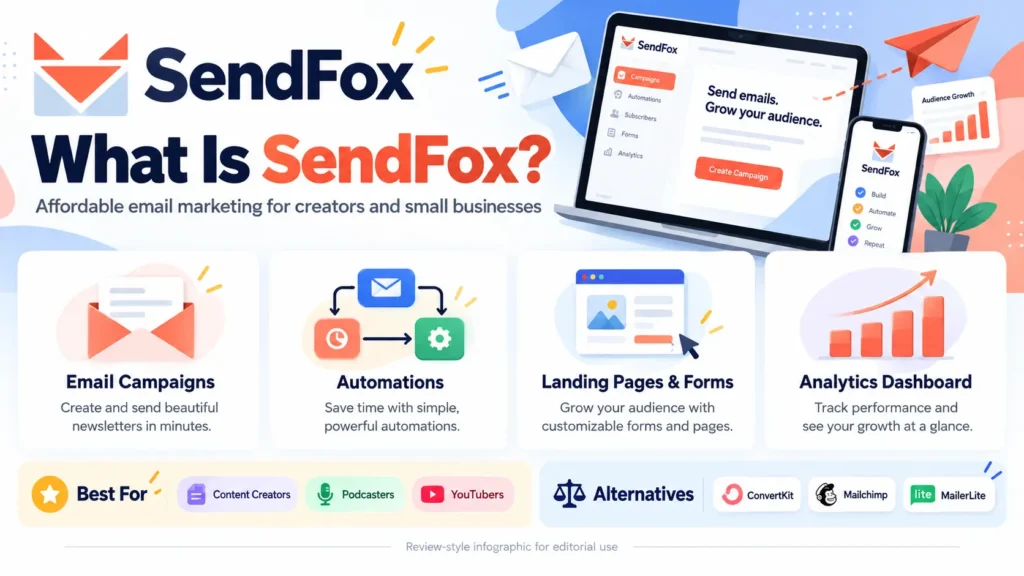
SendFox is an email marketing software platform built with simplicity, automation, and affordability in mind. It lets users create email campaigns, organize subscribers, build landing pages, set up automated sequences, and monitor performance from one dashboard.
What makes the platform particularly interesting is its availability through AppSumo, where eligible customers can purchase a lifetime license instead of immediately committing to a conventional recurring subscription.
But is SendFox actually a good investment? Can it replace popular email marketing software tools like Mailchimp, Kit, or MailerLite? And what should you know about the limits of its lifetime deal before purchasing?
In this detailed SendFox review 2026, we’ll explore its features, pricing, email automation capabilities, integrations, advantages, limitations, and potential alternatives. We’ll also explain who can benefit most from the software and whether its AppSumo lifetime offer makes financial sense.
SendFox Review 2026: Is This $29 Lifetime Email Marketing Software Tools Deal Worth It?
What is SendFox Best Email Marketing Software Tool Service Lifetime
What Is SendFox?
SendFox is an email marketing software solution designed to help individuals and smaller organizations communicate with subscribers, automate follow-up messages, and develop an audience without dealing with unnecessary technical complexity.
Rather than positioning itself as a massive enterprise marketing suite, SendFox focuses on making common email marketing software tasks easier to manage.
For example, a blogger can use SendFox to notify subscribers whenever a new article is published. A YouTuber can promote recently uploaded videos through newsletters. A small business can set up welcome messages for new subscribers, while a digital creator can build an automated email sequence introducing their products or services.
The platform combines several important tools:
- Email campaign creation and scheduling
- Automated email sequences
- Subscriber list management
- Landing pages and subscription forms
- RSS-based email campaigns
- Campaign performance tracking
- Contact tagging and segmentation
- Referral-driven audience growth
- API and supported third-party integrations
- AI-assisted email drafting
Together, these features allow creators to manage much of their email marketing software process from a single system.
The central appeal is straightforward: you can begin building meaningful relationships with subscribers without necessarily paying for a large collection of separate email marketing software applications.
Who Developed SendFox?
SendFox was developed as an AppSumo Original, with a focus on giving entrepreneurs access to practical email marketing software.
AppSumo is known for offering software deals to business owners, freelancers, creators, and email marketing software professionals. Its lifetime-deal model often appeals to buyers who want to reduce recurring software expenses.
SendFox follows that philosophy, although its current lifetime licensing includes a finite total email-sending allowance.
For someone comparing email marketing software tools primarily on affordability, that distinction is especially important.
SendFox at a Glance
| Feature | Details |
| Product | SendFox |
| Software category | Email marketing software and automation tools |
| Best suited for | Bloggers, creators, podcasters, YouTubers, entrepreneurs |
| Core functionality | Campaigns, automations, subscriber management, landing pages |
| Email editor | Block-based visual editor |
| Email automation | Multi-step sequences and supported behavioral workflows |
| List-building tools | Subscription forms, landing pages, referral widget |
| Performance tracking | Opens, clicks, subscriber activity and growth trends |
| Integrations | Zapier, API, KingSumo, Sumo.com |
| AI functionality | Email drafting and subject-line assistance |
| AppSumo Tier 1 price | $29 one-time |
| Tier 1 contacts | Up to 5,000 |
| Tier 1 email allowance | 300,000 total lifetime sends |
| Refund policy | 60 days through AppSumo, subject to its terms |
Pricing and feature availability reflect the published offer reviewed in October 2026. Always verify the latest conditions before purchasing.
Why Email Marketing Software Tool Still Matters
Before examining SendFox’s email marketing software tool’s individual features, it’s worth understanding why an email list remains useful.
Many businesses devote considerable time to acquiring followers on Instagram, TikTok, YouTube, Facebook, and other social platforms. These channels can be excellent sources of visibility, but follower counts do not guarantee that every person will see each new post.
Email offers a different relationship.
When someone voluntarily subscribes to your newsletter, you gain an opportunity to communicate with that person through their inbox.
This doesn’t guarantee engagement, sales, or deliverability. However, it creates a direct communication channel that isn’t entirely dependent on a social media feed deciding which posts deserve attention.
Imagine that you operate a blog reviewing digital email marketing software.
A visitor lands on your website after searching for an SEO tool comparison. They read your article, find it helpful, and subscribe to receive future software recommendations.
Instead of relying on that person to remember your website, you can send useful updates directly to their inbox.
Over time, these messages may encourage repeat visits, product exploration, and greater familiarity with your brand.
The key is sending relevant content rather than overwhelming subscribers with constant promotions.
A platform like SendFox email marketing software helps organize this process, especially when you are running a relatively small operation.
Key Features and Automations SendFox Best Email Marketing Software Tool Service Lifetime
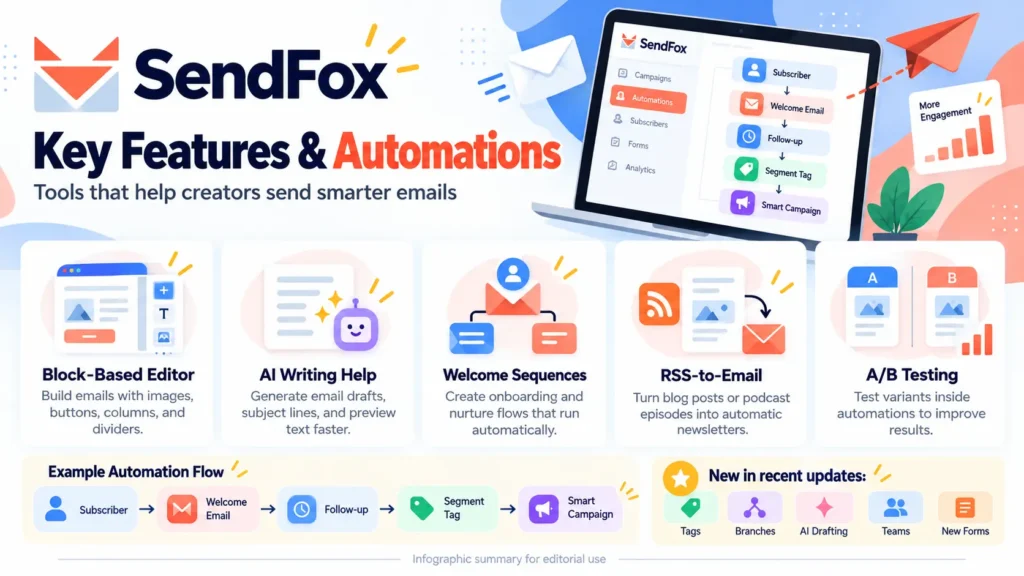
Key Features of SendFox Automation Email Marketing Software Tool: What Can You Actually Do?
Let’s explore the core capabilities and how they may fit into real-world email marketing software workflows.
-
Create Emails Using a Block-Based Editor
Writing email content should not require advanced coding skills.
SendFox email marketing software tool provides a visual editing environment that allows users to assemble newsletters using content blocks.
You can add text, images, buttons, columns, and dividers to create messages that are easier to read and navigate.
For example, suppose you’re preparing a monthly newsletter featuring three new software reviews.
You could begin with a short introduction, include separate sections for each product, and finish with buttons directing readers to the corresponding articles.
Instead of manually writing HTML, you can organize these elements visually.
This approach is particularly appealing to bloggers, freelancers, and smaller teams without dedicated email designers.
Reusable Templates and Content Sections
Repeating the same email layout every week can become tedious.
SendFox supports reusable templates and content sections, allowing users to maintain a consistent style without rebuilding campaigns from scratch.
A newsletter creator might prepare a standard layout featuring:
- A short greeting
- The week’s featured article
- Additional reading recommendations
- A promotional or informational section
- A closing message
That structure can then be adapted for future campaigns.
Consistency can make newsletters recognizable and simplify the publishing process.
However, businesses requiring extremely complex, highly customized email layouts should evaluate the editor before assuming that it offers the same flexibility as a full-scale email design platform.
-
AI-Assisted Email Writing
Coming up with newsletter ideas is one thing. Turning them into compelling messages is another.
SendFox includes AI-assisted email drafting features designed to reduce the time required to create campaigns.
Users can provide an idea, describe a topic, or supply a link to existing content, such as a blog article or video.
The software can then generate an initial email draft.
For instance, imagine publishing an article titled “Best Productivity Tools for Small Businesses.”
Rather than manually condensing the entire article into an email, you could provide its URL and use the generated draft as a starting point.
You would still need to review the result for accuracy, relevance, and tone.
AI-generated content should be treated as an editing assistant rather than a substitute for understanding your audience.
AI Subject Line Suggestions
The subject line is often the first thing subscribers notice.
SendFox can generate multiple subject-line and preview-text combinations based on an email draft.
This gives users alternatives to consider before scheduling a campaign.
For example, a newsletter promoting a beginner’s guide to email automation might use a direct educational subject line or a question highlighting a common problem.
Different approaches may appeal to different audiences.
The important point is that AI suggestions should be evaluated critically. Clear, accurate subject lines generally serve readers better than exaggerated promises or misleading curiosity hooks.
-
Email Marketing Software Tools Automation
One of SendFox’s most valuable capabilities is the ability to automate recurring communication.
Email automation allows messages to be delivered when certain conditions are met, rather than requiring the sender to manually prepare each follow-up.
Consider a new subscriber who joins your mailing list after downloading a free resource.
Instead of sending every follow-up individually, you could create a sequence that introduces your brand, shares helpful information, and encourages further engagement.
A simple welcome sequence might look like this:
Email 1: Welcome and introduction
Introduce your brand and explain what subscribers can expect.
Email 2: Helpful resources
Share popular blog posts, guides, videos, or other useful material.
Email 3: Your approach
Explain how your content or business helps solve relevant problems.
Email 4: Recommended next step
Encourage subscribers to explore a resource, compare a product, or learn more about your services.
Once the sequence is configured, eligible new subscribers can receive these emails automatically.
This can be particularly useful for creators who regularly attract new subscribers but don’t have time to communicate individually with everyone.
-
More Advanced Automation with Tags and Conditions
SendFox has expanded beyond straightforward scheduled email sequences.
Its newer automation functionality includes contact tags, tag-based triggers, and conditional actions.
Tags help users organize contacts according to interests, behaviors, or signup sources.
For example, you could create tags such as:
- SEO Interested
- Email Marketing
- Productivity Tools
- New Subscriber
- Engaged Reader
If someone signs up through a landing page about email marketing software, an appropriate tag can help you identify their interests.
Later, you could send relevant campaigns to subscribers with that tag rather than emailing your entire audience.
SendFox also supports automation actions that add or remove tags after certain activities.
This creates possibilities for more personalized follow-up.
For instance, someone who clicks a link about email automation could enter a related sequence, subject to the workflow features available on their plan.
Conditional branches further improve flexibility by allowing different actions depending on whether a contact meets specific criteria.
For small businesses, this may be enough to build useful automated customer journeys without investing in a more expensive email marketing software automation suite.
-
A/B Testing for Email Marketing Software Automations
Email performance can be difficult to predict.
A subject line that sounds compelling to the sender may not attract much attention from subscribers.
Similarly, two emails promoting the same resource may produce different engagement levels because of their wording, structure, or call to action.
SendFox offers A/B testing functionality within supported automations.
Instead of relying entirely on assumptions, users can compare variations and examine which performs better according to the test criteria.
For example, you might test two versions of a welcome email:
Version A: A short introduction followed by one prominent link.
Version B: A more detailed introduction featuring several helpful resources.
The resulting data can help you understand how subscribers respond.
It is important to remember that A/B testing is most informative when the audience is large enough to produce meaningful comparisons.
A test involving only a handful of recipients may not provide reliable conclusions.
Still, having experimentation features available can be valuable as your list grows.
-
RSS-to-Email Marketing Software Smart Campaigns
For bloggers, podcasters, and other regular publishers, this is one of SendFox’s particularly practical capabilities.
RSS-to-email automation connects published content with email distribution.
If your website or podcast provides an RSS feed, SendFox can use it to create email updates about new content.
Suppose you publish two articles each week.
Without automation, your typical process might involve opening your email platform, creating a new campaign, adding the article titles, inserting links, choosing recipients, and scheduling delivery.
A properly configured RSS-based campaign can reduce that repetitive work.
This is especially useful for:
- News and editorial websites
- Personal blogs
- Educational publishers
- Podcast creators
- Niche content websites
- Businesses with regularly updated knowledge bases
However, automated emails should still be reviewed periodically to ensure that formatting, content selection, and sending frequency remain appropriate.
Automation saves time, but it shouldn’t eliminate editorial oversight.
-
Subscriber Management and Contact Organization: Email Marketing Software
An email list becomes more useful when you can understand who your subscribers are and how they interact with your content.
SendFox includes contact management features that help users organize subscriber information and activity.
Rather than treating every subscriber as an identical entry, marketers can use lists, tags, and contact records to develop a more structured audience database.
This matters because someone who subscribes for software discounts may not have the same interests as someone who wants educational blogging tutorials.
Sending every subscriber the same message can reduce relevance.
With organized contacts, you can create more targeted campaigns.
Contact Activity Timeline
SendFox also provides a contact-level activity view.
This may include information about emails sent, recorded opens, clicks, and list changes.
For example, you might notice that one subscriber consistently clicks your articles about productivity software but rarely interacts with your SEO-related messages.
That observation may help inform future segmentation.
Remember, however, that open tracking isn’t perfectly reliable.
Email privacy features, automatic image loading, and other technical factors can affect reported opens.
Clicks, replies, conversions, and actual business outcomes should also be considered when evaluating engagement.
-
Landing Pages for Email Marketing Software List Building
Attracting website visitors is only part of audience development.
You also need a straightforward way for interested visitors to subscribe.
SendFox provides landing pages that can be used to collect email registrations.
These pages can be especially helpful when you want to promote a newsletter, free guide, resource collection, or content series.
Imagine creating a free checklist called “20 Essential Tools for Starting an Online Business.”
You could build a landing page explaining what readers will receive and include a subscription form.
People interested in the resource can join your list.
SendFox also supports custom-domain landing pages, allowing businesses to present a more branded experience.
Using your own domain can make the signup experience feel more consistent with the rest of your website.
Before launching, make sure the landing page clearly explains what subscribers are signing up for and how their information will be used.
-
Multiple Types of Signup Forms for Email Marketing Software
Not every subscriber will discover your mailing list through a dedicated landing page.
Some visitors may prefer to sign up while browsing your website.
SendFox supports subscription forms, including newer formats such as popups, slide-ins, and sticky bars.
These formats provide different ways to invite visitors to subscribe.
For example, a blog might place an inline form beneath an article, while a small business might display a subscription invitation after visitors explore a relevant page.
The goal shouldn’t be to interrupt every visitor.
A thoughtfully placed form with a clear benefit is generally more useful than an aggressive popup that appears before someone has had a chance to read anything.
You should also consider mobile usability, accessibility, consent requirements, and the overall visitor experience.
-
Built-In Referral Widget for Email Marketing Software
A referral system can encourage existing subscribers to introduce your newsletter to other people.
SendFox includes a referral widget designed to support subscriber-driven growth.
This may be useful for creators who want to reward readers for recommending their newsletter.
For example, a newsletter publisher could experiment with offering a downloadable bonus or exclusive resource after a subscriber refers a certain number of new readers, depending on how the referral program is configured.
Referral campaigns work best when the newsletter already provides something subscribers genuinely appreciate.
Software can help organize the process, but it cannot replace valuable content or a strong relationship with readers.
-
Email Analytics and Reporting
Sending campaigns without reviewing results makes it difficult to improve your strategy.
SendFox includes reporting tools that help users understand how campaigns perform.
Available information includes email opens, clicks, popular links, subscriber activity, and list-growth trends.
The dashboard also provides a health score intended to surface areas that may need attention.
These insights can help answer practical questions:
Which topics receive the most interest?
Are subscribers clicking through to your website?
Is your subscriber list growing consistently?
Are certain campaigns performing better than others?
For example, if your readers click productivity-tool recommendations more frequently than general email marketing news, you may decide to publish more productivity-related material.
Analytics should guide decisions, not dictate them mechanically.
An email with fewer clicks might still strengthen customer relationships or deliver an important announcement.
-
API Access and Third-Party Integrations
Email marketing software rarely operates in isolation.
Your website, forms, customer database, lead-generation applications, and publishing tools may all need to exchange information.
SendFox supports API access and integrations that can help connect it with other services.
The integrations highlighted in the product listing include Zapier, KingSumo, and Sumo.com.
Zapier is particularly useful for creating automated connections between supported applications.
For example, a marketer might want a contact captured through another application to be added to a SendFox list.
The feasibility depends on the specific applications, permissions, triggers, and actions available.
SendFox has also introduced AI-assistant connectivity through its Model Context Protocol integration, including workflows involving Claude.
Because some AI-agent capabilities and advanced functionality depend on the subscription or add-on involved, verify access for your particular license before building an important workflow around them.
Pricing of SendFox Best Email Marketing Software Tool Service Lifetime
SendFox Email Marketing Software Lifetime Deal on AppSumo: Pricing Explained
One of the main reasons prospective buyers investigate SendFox is its lifetime offer.
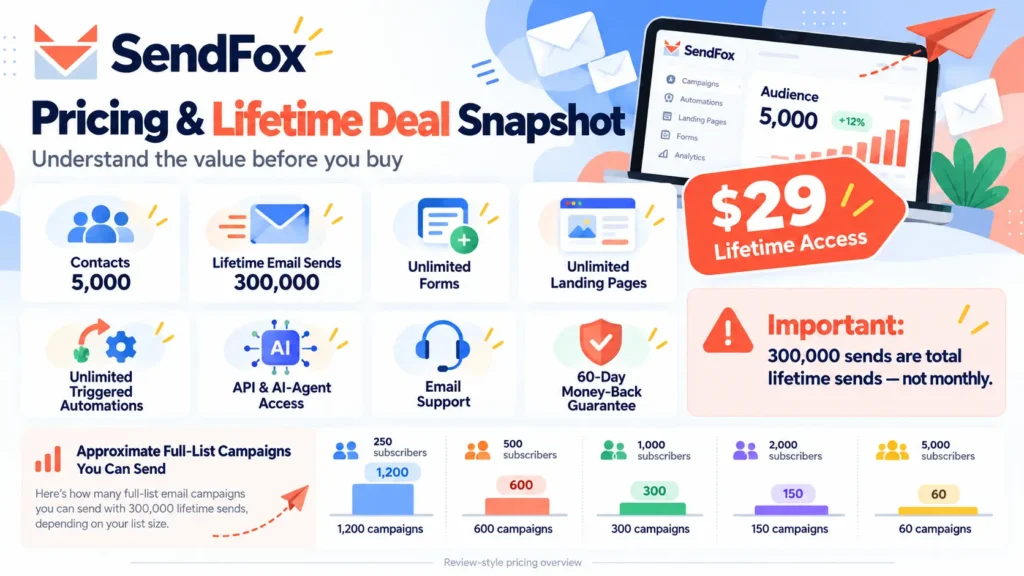
Under the published AppSumo License Tier 1 offer, the price is $29 as a one-time payment.
Unlike software that requires a monthly subscription from the beginning, this license provides access under the lifetime-plan terms.
However, there is a crucial limitation.
The plan includes a fixed allowance of 300,000 total email sends over its lifetime.
It does not provide unlimited email delivery.
What Is Included in the $29 SendFox Email Marketing Software Lifetime Deal?
| Feature | License Tier 1 |
| One-time purchase price | $29 |
| Maximum contacts | 5,000 |
| Total lifetime email sends | 300,000 |
| Scheduled campaigns | Included |
| Smart campaigns | Included |
| Contact lists | Unlimited |
| Forms | Unlimited |
| Landing pages | Unlimited |
| Triggered automations | Unlimited |
| Referral widget | Included |
| CRM contact view | Included |
| API access | Included |
| AI-agent-related access | Listed, subject to feature eligibility |
| Translations | 30+ languages |
| Support | Email support |
| Refund eligibility | 60 days |
The published terms also specify that users must activate their licenses within 60 days of purchase.
The deal does not support stacking multiple codes to accumulate additional sending capacity.
Understanding the 300,000 Lifetime Email Limit
This is arguably the most important consideration in the entire review.
The 300,000-email allowance is a cumulative sending pool covering the account.
Every email delivered to an individual recipient counts toward that allowance, including normal newsletters and automated messages.
For instance, sending one newsletter to 1,000 recipients uses 1,000 sends.
Sending the same newsletter to 5,000 recipients uses 5,000 sends.
Let’s compare a few simplified examples.
| Subscribers emailed per campaign | Approximate full-list campaigns available |
| 250 | 1,200 |
| 500 | 600 |
| 1,000 | 300 |
| 2,000 | 150 |
| 5,000 | 60 |
These figures assume the entire allowance is used only for identical full-list campaigns, with no additional automation or transactional sends counted against the pool.
Real usage will vary.
A blogger emailing 500 people once per week could theoretically make the allocation last for many years at that constant usage level.
On the other hand, a business emailing 5,000 subscribers every week could consume the allowance much more quickly.
For a full 5,000-contact list, 60 weekly campaigns represent only a little more than one year of weekly newsletters, before accounting for automated messages.
This illustrates why a lifetime license and a lifetime sending allowance are not the same thing.
What Happens When the Lifetime Email Allowance Runs Out?
According to the SendFox team’s explanation on AppSumo, campaigns stop sending once the total allowance has been exhausted.
Users who want to continue sending can move to an eligible monthly Pro plan offering a recurring sending allocation.
Their existing contacts, lists, and historical emails remain in the account.
This makes it essential to estimate your expected sending volume before purchasing.
SendFox also offers additional paid functionality, including options related to branding and advanced capabilities.
For example, its Empire Add-On has been advertised at $10 per month for branding removal and additional features.
Always check which features belong to the lifetime license and which require separate payments.
Is the SendFox Email Marketing Software Lifetime Deal Worth $29?
The answer depends heavily on how you intend to use it.
For a solo blogger with a modest subscriber list, the one-time price may provide an accessible entry into organized email marketing.
You can experiment with signup forms, newsletters, automated welcome messages, and audience segmentation without committing to a traditional monthly email marketing software subscription immediately.
That’s a meaningful advantage when your website isn’t generating consistent revenue yet.
However, the economics change as your audience grows.
A newsletter publisher who sends frequent emails to thousands of subscribers could consume the fixed allowance relatively quickly.
At that point, the cost of a continuing subscription becomes relevant.
A Practical Cost Comparison
Imagine two creators.
- Creator A: The small niche blogger
This creator has 400 subscribers and sends two newsletters every month.
At that constant volume, the main newsletters would use approximately 9,600 sends per year.
The lifetime allowance could last a considerable time, even after allowing for some additional automated messages.
- Creator B: The rapidly growing newsletter business
This creator has 4,000 subscribers and sends three campaigns every week.
That amounts to approximately 12,000 sends per week, excluding automation.
At that rate, 300,000 sends would cover around 25 weeks.
Although both creators pay the same initial license price, their long-term costs could be very different.
The key takeaway: Evaluate lifetime software deals according to your expected usage, not merely the headline discount.
How to Get Started with SendFox Email Marketing Software
Getting started with SendFox does not necessarily require an elaborate email marketing software strategy.
A structured setup can help you avoid common mistakes.
→ Step 1: Create and Configure Your Account
Begin by registering with SendFox or purchasing and activating the appropriate AppSumo license.
Review your account settings and verify which features are available.
If you’re purchasing the lifetime offer, confirm the activation deadline and keep a record of your license terms.
→ Step 2: Set Up Your Sending Identity
Configure the relevant sender information, including your business or creator name and appropriate sending address.
Follow the platform’s guidance for domain authentication where applicable.
Proper email authentication is important for establishing legitimate sending practices, although it doesn’t guarantee inbox placement.
→ Step 3: Create Your First Contact List
Organize contacts around a clear subscription purpose.
For example, BestDealPilot could maintain a newsletter list for readers interested in software reviews and digital-product offers.
Avoid uploading purchased lists or contacts who have not given appropriate permission.
A smaller, interested audience is generally more valuable than a large list of people who never requested your emails.
→ Step 4: Build a Signup Form or Landing Page
Create a simple subscription experience explaining why someone should join.
You might offer:
- New software review notifications
- Curated digital-tool recommendations
- Educational guides
- Carefully selected software-deal updates
Keep the promise specific.
Visitors should understand what kinds of emails they will receive.
→ Step 5: Design Your Welcome Email
Your first automated message can introduce the newsletter and set expectations.
Explain what subscribers can look forward to, how frequently you plan to communicate, and where they can find your most helpful resources.
Avoid overwhelming new contacts with too many promotional links.
→ Step 6: Configure a Basic Automation
Start with a short welcome sequence rather than a complicated workflow.
You can expand your automation strategy after seeing how subscribers respond.
→ Step 7: Prepare Your First Campaign
Use SendFox’s email editor to create a useful message.
Include a clear subject line, readable content, and an obvious next step.
Test the email before sending it to subscribers.
→ Step 8: Analyze Performance and Improve
After sending your campaign, review available reporting data.
Look for trends over several campaigns rather than making major decisions based on a single email.
Gradual improvements in relevance, content quality, and segmentation can be more effective than constantly changing your entire strategy.
Who Should Use SendFox Email Marketing Software?
Who Should Use SendFox Best Email Marketing Software Tool Service Lifetime
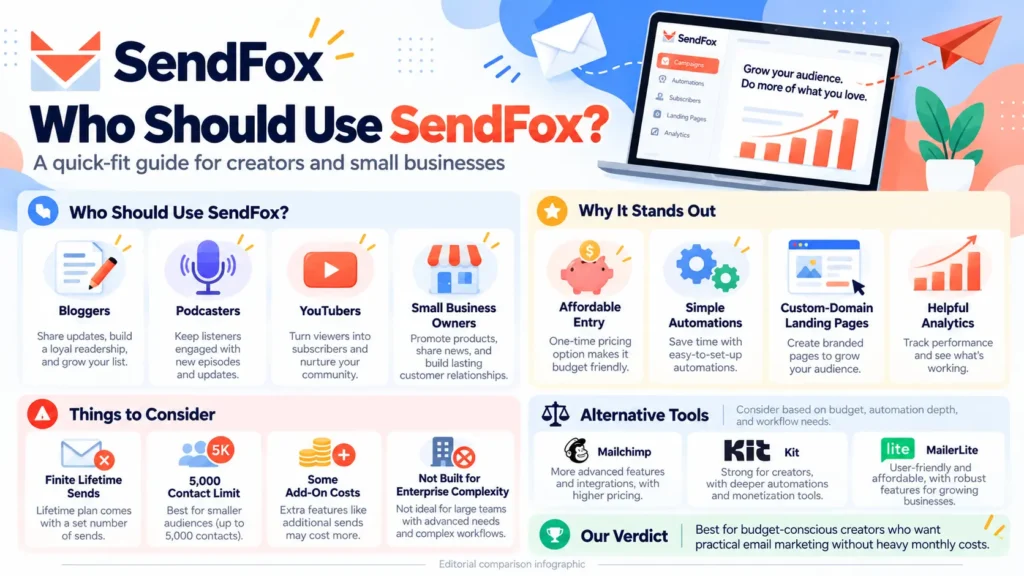
SendFox is not designed for every possible marketing scenario.
Its strongest appeal is to users who want useful email marketing software functionality without immediately adopting a complex, expensive ecosystem.
-
Bloggers and Website Publishers
Bloggers can use SendFox to distribute articles, build a subscriber community, and encourage repeat website visits.
RSS-based campaigns are particularly helpful for websites that publish regularly.
A software review blog, for example, could send subscribers updates about new product comparisons, tutorials, and buying guides.
-
YouTubers and Video Creators
YouTube creators often rely heavily on platform notifications and recommendations.
An email newsletter can provide an additional way to reach interested viewers.
Creators might send updates about new videos, downloadable resources, livestream schedules, or educational series.
SendFox’s AI drafting capability may also help turn existing video content into newsletter copy.
-
Podcasters
Podcasters can use email to strengthen relationships beyond podcast listening platforms.
A podcast newsletter might share new episode announcements, relevant links, show notes, or supplementary resources.
Automated RSS-based campaigns may reduce repetitive distribution tasks.
-
Freelancers and Consultants
Freelancers often need a simple way to follow up with people interested in their expertise.
A consultant could use a subscription form to collect leads and build an educational sequence that explains common problems in their field.
However, SendFox should not automatically be treated as a complete client relationship management or sales pipeline system.
-
Small Business Owners
Smaller businesses may find value in SendFox for announcements, newsletters, and customer education.
Its segmentation and automation features can help organize communication without introducing unnecessary complexity.
Businesses with sophisticated ecommerce requirements or highly detailed customer journeys should compare specialist alternatives before deciding.
-
Affiliate Marketers
Affiliate marketers can use email to build relationships with readers interested in product recommendations.
Instead of sending only promotional messages, a thoughtful newsletter could explain how software works, compare competing tools, and highlight relevant use cases.
Transparency is especially important.
Promotional relationships and affiliate links should be disclosed appropriately, and campaigns must comply with platform policies and applicable email marketing laws.
SendFox Email Marketing Software Pros and Cons
A useful software review should discuss both advantages and limitations.
Advantages of SendFox email marketing software
- Affordable entry point
The $29 lifetime license can be appealing to individuals who want to control their initial software spending.
- Useful automation functionality
Welcome sequences, tag-based workflows, and scheduled campaigns reduce manual communication work.
- Convenient list-building tools
Forms and landing pages allow creators to capture newsletter subscriptions without relying on multiple unrelated platforms.
- RSS-to-email capabilities
Regular publishers can reduce the time spent announcing new articles, podcasts, or other content.
- Audience organization
Lists, contact tags, and activity information make it easier to send more relevant messages.
- Integrated reporting
The dashboard provides visibility into campaign engagement and list development.
- Growing feature set
Recent additions such as AI drafting, updated editing tools, and enhanced automation demonstrate continued product development.
- Accessible for smaller teams
The platform’s overall focus is better suited to straightforward workflows than enterprise-level email marketing complexity.
Disadvantages of SendFox Email Marketing Software
- Lifetime sending limits
The 300,000-email allowance is finite and may be insufficient for high-volume senders.
- Subscriber limits
The entry-level lifetime license supports up to 5,000 contacts.
- Additional paid features
Removing branding and using certain advanced capabilities may require paid subscriptions or add-ons.
- Not ideal for every advanced workflow
Businesses requiring highly sophisticated behavioral segmentation, detailed ecommerce attribution, or extensive customer lifecycle orchestration may need a different platform.
- Automation requires proper configuration
Although automated sequences save time, setup mistakes can lead to irrelevant messages or unnecessary sending.
- Email deliverability remains a shared responsibility
Using SendFox does not guarantee inbox delivery. Subscriber quality, authentication, content, reputation, and recipient behavior also matter.
- Long-term costs depend on usage
An inexpensive initial license may eventually be supplemented by recurring expenses if your sending requirements increase.
SendFox vs Mailchimp vs Kit vs MailerLite
Choosing email marketing software becomes easier when you compare tools according to your actual requirements.
SendFox is often considered alongside Mailchimp, Kit (formerly ConvertKit), and MailerLite.
These products overlap in their core purpose but differ in target audience, feature depth, and pricing structure.
| Platform | General positioning | Potential strength | Consideration |
| SendFox | Affordable creator-focused email marketing | Simple workflows and lifetime purchase option | Finite lifetime sending allowance |
| Mailchimp | Broad marketing and audience engagement | Wider marketing ecosystem | Plan costs and feature restrictions |
| Kit | Creator-focused email marketing | Creator monetization and audience workflows | Pricing and advanced-feature access |
| MailerLite | Email campaigns and audience growth | Newsletter creation and landing pages | Plan-dependent sending and feature limits |
This is a qualitative overview, not a verified live pricing comparison. Competitor features and plans change.
SendFox vs Mailchimp
Mailchimp is a familiar name in email marketing software and offers capabilities for businesses managing a range of marketing activities.
Its broader ecosystem may be attractive to organizations that need more than straightforward newsletters.
SendFox, by comparison, emphasizes accessible email communication, automation, and list building.
If your requirements are relatively simple and your email volume is modest, SendFox may offer a more economical starting point.
However, if you require specialized email marketing software functionality or integrations, Mailchimp may deserve closer consideration.
SendFox vs Kit
Kit is designed with creators in mind, making it a particularly relevant comparison.
Both products can support subscriber communication and email automation.
Kit’s creator-oriented ecosystem may appeal to users seeking more specialized monetization or audience management workflows.
SendFox may be appealing if your priority is a simpler setup and an affordable initial purchase.
The right choice depends on which features are essential to your publishing or creator business.
SendFox vs MailerLite
MailerLite is another option worth evaluating for newsletter publishing, email campaigns, and landing pages.
Both tools can serve bloggers and small business owners.
SendFox’s lifetime license can be attractive to buyers seeking to avoid an immediate recurring expense.
MailerLite may be worth considering if its current editor, automation tools, or pricing model better matches your requirements.
Rather than selecting a platform based solely on its starting price, calculate costs at your expected subscriber count and email frequency.
Can SendFox Email Marketing Software Help Improve Email Deliverability?
One common question is whether SendFox can help messages reach subscribers’ inboxes.
The platform provides infrastructure for sending marketing emails, but no email marketing software provider can promise perfect inbox placement.
Deliverability depends on several factors, including sender authentication, domain reputation, subscriber engagement, bounce rates, complaint rates, and email content.
To improve the quality of your email program, focus on the following practices.
Use permission-based lists. Send messages to people who have knowingly subscribed.
Authenticate your sending domain. Follow the platform’s available guidance for relevant DNS and email authentication records.
Avoid misleading subject lines. Readers should receive what the subject line promises.
Maintain healthy contact lists. Review invalid addresses, complaints, and disengaged subscribers.
Make unsubscribing straightforward. Respect recipient preferences and applicable email laws.
Monitor performance trends. Watch for unusual changes in bounce rates, complaints, or engagement.
These practices matter regardless of whether you choose SendFox or another email marketing service.
SendFox for Affiliate Marketing and Niche Websites
If you operate an affiliate blog or product recommendation website, SendFox can support a practical email content strategy.
Consider a website reviewing software, hosting services, productivity applications, and digital email marketing software tools.
Visitors may arrive through informational search queries, such as “best email marketing software for beginners.”
They might read a comparison, explore a few recommendations, and leave without purchasing.
A helpful email newsletter allows those readers to return for future content.
You could build a mailing list focused on software reviews and send occasional updates covering:
- Recently published software comparisons
- Tutorials for popular tools
- Product updates relevant to readers
- Practical buying checklists
- Carefully selected offers and discounts
The most effective approach is to provide independent information that helps subscribers make better decisions.
Constantly repeating discount messages without meaningful context can undermine trust.
For a website such as BestDealPilot, a newsletter can complement search traffic by encouraging interested readers to revisit useful reviews.
It should not replace a sound SEO strategy, high-quality website content, or transparent affiliate disclosures.
How SendFox Email Marketing Software Can Support a Content Marketing Strategy
Email marketing software and content marketing often work best together.
Content attracts interested readers, while email can help maintain a relationship after their initial visit.
Here’s an example of a simple workflow.
First, publish an in-depth article answering a relevant search question.
Next, offer visitors the opportunity to receive future resources or related guides.
Then, use SendFox to welcome subscribers and introduce them to helpful material.
As you publish more relevant content, distribute selected updates to the appropriate subscriber groups.
Finally, review engagement information to learn which topics resonate most.
This creates a repeating cycle:
Helpful content → Interested visitor → Voluntary subscription → Relevant email communication → Return visit
The objective should be to build a useful audience relationship, not simply increase email volume.
Practical Tips for Getting Better Results with SendFox Email Marketing Software
Software alone won’t determine the success of your email marketing software.
Your strategy, content quality, and consistency also matter.
→ Write for a Specific Audience
Avoid trying to appeal to everybody.
A newsletter about productivity tools for freelancers can provide more focused value than a newsletter covering unrelated topics without a clear purpose.
→ Offer a Clear Reason to Subscribe
Explain the benefit.
Instead of saying only “Join our newsletter,” describe the information or resources readers can expect.
→ Keep Your Early Emails Simple
New subscribers don’t necessarily need a long promotional sequence.
Begin with a welcome message and a few useful resources.
Expand your workflow as you learn what readers appreciate.
→ Segment Based on Relevant Interests
Tags and lists can help avoid sending unrelated campaigns.
Use segmentation where it genuinely improves subscriber experience rather than creating unnecessary complexity.
→ Review Your Sending Allowance Regularly
This is especially important for SendFox lifetime-license users.
Every campaign and automation consumes part of your total allowance.
Monitor the remaining sending pool as your audience grows.
→ Focus on Meaningful Outcomes
Open rates and clicks are useful signals, but they shouldn’t be your only measurements.
Consider whether your emails generate relevant website visits, useful conversations, downloads, registrations, or business opportunities.
→ Keep Your Messaging Consistent
A consistent newsletter schedule can help subscribers know what to expect.
However, frequency should match the amount of genuinely useful content you have.
Sending fewer high-quality emails may be better than filling inboxes with repetitive messages.
Important Things to Check Before Buying SendFox Email Marketing Software Tools
Before purchasing the SendFox AppSumo lifetime deal, consider your actual requirements.
Estimate your expected audience size. If you’re already approaching 5,000 contacts, the entry-level plan may not provide enough room for growth.
Calculate expected email volume. Include newsletters, welcome sequences, automated follow-ups, and other email activity.
Check the features included in your license. Do not assume every feature advertised across SendFox is available without an add-on.
Review your integration requirements. Confirm that the API or specific integration you need supports your intended workflow.
Examine the branding conditions. If completely white-labeled messages are important, check whether an additional payment is required.
Understand the refund terms. AppSumo advertises a 60-day money-back guarantee for the offer, subject to its applicable terms.
Consider future growth. A lifetime deal can reduce initial costs, but a growing business may eventually require a different plan or platform.
These checks can prevent a purchasing decision based entirely on the attractive headline price.
Is SendFox Email Marketing Software Tools Safe and Legitimate?
SendFox is an established email marketing software tool associated with AppSumo.
Its public product information describes support for campaign management, automation, contact organization, and GDPR-related compliance.
However, software legitimacy and the security of your particular setup are different questions.
Before uploading a customer database or collecting personal information, review the provider’s current privacy policy, data-processing terms, security practices, and relevant compliance documentation.
You should also evaluate your own responsibilities regarding consent, data retention, subscriber rights, and marketing communications.
GDPR-related product claims do not automatically make every customer’s use of the software compliant.
That depends on how the software is configured and how personal information is collected and processed.
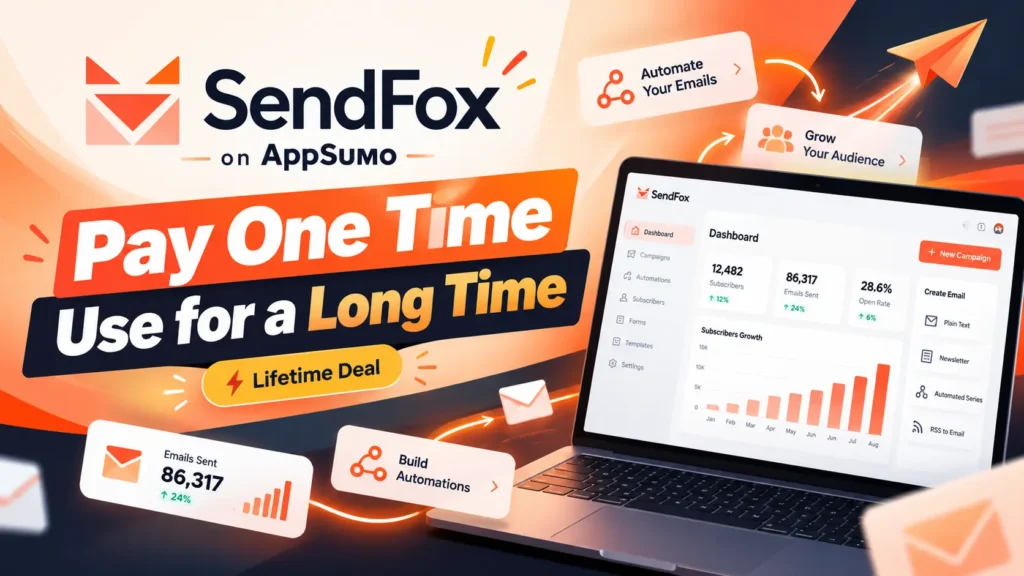
Buy Now SendFox Best Email Marketing Software Tool Service Lifetime
Frequently Asked Questions About SendFox Email Marketing Software Automation Tools
- What is SendFox used for?
SendFox is used for email marketing software activities such as sending newsletters, scheduling campaigns, managing subscribers, building signup forms, creating landing pages, and automating follow-up emails. It is primarily designed for creators, entrepreneurs, publishers, and smaller businesses seeking a relatively straightforward email marketing software platform.
- Is SendFox email marketing software free to use?
SendFox email marketing software has offered free access options, but its limits and features may change. The AppSumo offer covered in this review is a paid lifetime license starting at $29. Check SendFox’s current official pricing page for the latest free-plan availability and restrictions.
- How much does SendFox email marketing software cost on AppSumo?
As of the offer reviewed this year, SendFox email marketing software tools License Tier 1 costs $29 as a one-time payment. It includes up to 5,000 contacts and a total allowance of 300,000 lifetime email sends. Higher requirements or certain additional features may involve other plans or recurring payments.
- Does SendFox email marketing software offer a lifetime deal?
Yes. SendFox offers a lifetime license through AppSumo under published deal conditions. Importantly, lifetime access does not mean unlimited lifetime email sends. The entry-level deal includes a fixed sending allowance.
- Does SendFox email marketing software provide unlimited email sending?
No, not under the $29 AppSumo lifetime license described here. The plan includes 300,000 total lifetime email sends. Once that allowance is exhausted, users need an eligible paid sending plan to continue.
- What happens after I use all 300,000 lifetime email sends?
According to the SendFox team’s published explanation, sending stops once the allocation is depleted. Users can obtain additional ongoing sending capacity through an eligible monthly Pro subscription. Their existing contact records, lists, and previously created content are retained.
- Can I use SendFox for affiliate marketing?
SendFox can support permission-based newsletters for affiliate marketers, provided the campaigns comply with SendFox’s acceptable-use policies and applicable laws. Affiliate marketers should focus on relevant content and provide clear disclosures when promoting products through affiliate relationships.
- Does SendFox email marketing software support email automation?
→ Yes. SendFox email marketing software tools support automated email sequences, including welcome and onboarding workflows. Its expanded automation tools also include contact tags, trigger-based actions, and supported conditional branches.
- Can SendFox email marketing software automatically send new blog posts?
→ Yes. SendFox includes RSS-to-email Smart Campaign functionality, making it possible to distribute updates from compatible content feeds. This can help bloggers and publishers reduce the manual work involved in promoting newly published content.
- Does SendFox email marketing software support A/B testing?
→ SendFox email marketing software tools advertise A/B testing inside its automation functionality. This allows users to compare supported email variations. Before building a strategy around testing, confirm the specific options and availability under your plan.
- Can I create landing pages with SendFox email marketing software?
→ Yes. SendFox includes landing page creation capabilities, and the advertised AppSumo Tier 1 plan includes unlimited landing pages. The product also supports branded landing pages using custom domains.
- Does SendFox email marketing software integrate with Zapier?
→ Yes. Zapier is one of the integrations identified in SendFox’s official product listing. Users can investigate supported workflows to connect SendFox with other applications. Individual automations depend on the available triggers, actions, and account permissions.
- Does SendFox email marketing software have AI-powered features?
→ Yes. SendFox has introduced AI-assisted email drafting and subject-line generation. It also offers certain AI-agent-related capabilities. Usage limits and feature access can vary by plan, so users should confirm the applicable conditions before purchasing.
- Is SendFox email marketing software tools better than Mailchimp?
→ Neither platform is automatically better for everyone. SendFox may appeal to creators seeking straightforward email marketing software tools and an affordable lifetime purchase. Mailchimp may suit businesses needing features from its broader marketing ecosystem. Compare current pricing, campaign volumes, automation needs, and integrations before making a decision.
- Is SendFox email marketing software suitable for beginners?
→ SendFox email marketing software is designed with smaller creators and entrepreneurs in mind, making it a reasonable option for beginners who want to learn email marketing software. Users can start with basic campaigns and gradually explore automations, segmentation, and reporting.
- Can I use SendFox email marketing software with my own domain?
→ SendFox email marketing software supports custom-domain landing pages and relevant sender-domain configuration. The exact requirements and availability of domain-related settings should be confirmed using the current documentation and your subscription details.
- Can SendFox email marketing software replace Kit or MailerLite?
SendFox may replace another email marketing software platform for users whose requirements primarily involve newsletters, list management, signup forms, and straightforward automations. Businesses that depend on specialized integrations, advanced workflows, or particular monetization features should compare their requirements carefully before migrating.
- Does SendFox email marketing software have a refund policy?
The reviewed AppSumo offer advertises a 60-day money-back guarantee. Buyers should check the current deal conditions, eligibility rules, and relevant refund procedures before completing their purchase.
Final Verdict: Should You Buy SendFox Email Marketing Software Tools?
After examining SendFox’s advertised capabilities, pricing structure, automation tools, and potential limitations, the platform appears to offer a practical email marketing option for the right type of user.
Its main appeal is accessibility.
A blogger, podcaster, YouTuber, or smaller business owner can explore email marketing software features without immediately taking on the expense of a conventional subscription-based marketing platform.
The combination of campaign scheduling, visual email editing, landing pages, signup forms, contact management, RSS automation, and analytics covers many common email marketing software tools needs.
Recent additions such as AI writing assistance, contact tagging, and expanded automation functionality also make the product more interesting than a basic newsletter sender.
However, the lifetime sending allowance deserves serious attention.
The $29 offer is most attractive to users who expect moderate email volumes and want to control their initial spending.
For publishers sending multiple campaigns each week to several thousand subscribers, the fixed allowance may be consumed relatively quickly.
In that situation, comparing the total cost of continued SendFox usage against alternative platforms is essential.
Our editorial assessment: SendFox is worth considering for budget-conscious creators and small businesses that want a convenient way to begin or organize email marketing software tools. It is less compelling as a permanent, one-time-cost solution for high-volume senders because the lifetime email allocation does not replenish.
Rather than purchasing it simply because the deal looks inexpensive, consider the size of your list, how frequently you plan to send emails, and which features you actually need.
For the right audience, SendFox can provide a useful starting point for building subscriber relationships and making email communication more manageable.
Explore the SendFox Lifetime Deal on AppSumo: Get It Now
Disclaimer: This article is an independent editorial review based on publicly available product information and the advertised AppSumo offer. It does not represent hands-on testing or an endorsement by SendFox or AppSumo. Features, pricing, usage limits, and deal availability may change. Verify the latest details with the provider before purchasing. If BestDealPilot uses an affiliate link, a separate affiliate disclosure should be included.